![turfrad_logo_outlines (1)-1.svg]](https://support.turfrad.com/hubfs/turfrad_logo_outlines%20(1)-1.svg)
The next step in irrigation management is moving beyond weather-based estimates and toward decisions based on actual measured soil moisture. Evapotranspiration (ET) data can help estimate how much water turf may have lost at the point where it is estimated, but it does not directly tell you what is happening in the root zone across a broad area.
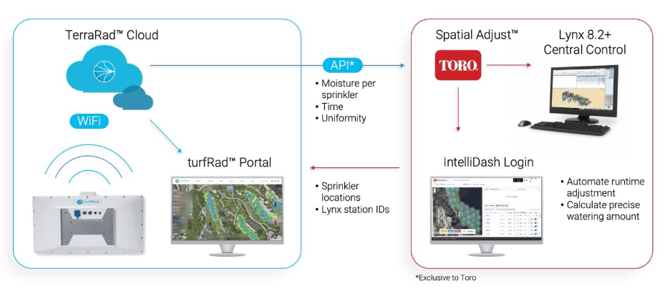
turfRad closes that gap by automatically measuring volumetric water content (VWC) across large turf areas and associating those measurements with individual sprinkler heads. For courses using Toro Lynx, that measured moisture data can be used by Toro Spatial Adjust™ to help automate sprinkler-by-sprinkler irrigation adjustments.
This creates a shift from simply replacing estimated water loss to irrigating based on actual field conditions.
The Basic Workflow
The integration between turfRad and Toro Spatial Adjust™ follows a simple cycle:
- turfRad measures soil moisture across the course.
- Measurements are associated with individual sprinkler areas.
- Moisture data uploads to the TerraRad Cloud.
- Spatial Adjust receives the measured moisture data.
- Spatial Adjust calculates precise runtime adjustments and applies them directly to Lynx.
In short:
Measure → Compare → Adjust → Verify
turfRad provides the measured moisture data. Spatial Adjust uses that data to calculate and apply sprinkler-by-sprinkler irrigation adjustments through Lynx.
It Starts with Measuring Moisture
Before irrigation can be automated, moisture needs to be measured accurately and consistently. This is the role turfRad plays.
As you collect scans, turfRad measures volumetric water content, or VWC, across the course and associates those measurements with individual sprinkler heads. The sprinkler-level data is based on an average of hundreds of turfRad measurements from within the effective throw radius of the sprinkler. This creates something most irrigation systems have never had before: a measured moisture value for each sprinkler area.
Instead of uniformly “blanket irrigating” according to ET, or manually adjusting heads by occasionally suspending a sprinkler, increasing a percentage, or reducing runtime in selected areas, turfRad routinely shows how moisture actually varies across the course, and Spatial Adjust irrigates accordingly. Toro NSN provides the sprinkler map data and station tags / Lynx IDs to turfRad in order to keep the system synchronized.
This measured data is the foundation that makes automated irrigation adjustment meaningful.
Automating the Process with Spatial Adjust
Using turfRad measurements, per-sprinkler Target VWC values, and forecast ET data from the DTN weather network, Spatial Adjust calculates how much water (if any) each sprinkler requires. Spatial Adjust will completely suspend an irrigation head if it determines that there is enough moisture to make it through the day without dipping below the Target level.
For every head, Spatial Adjust can:
- Evaluate measured moisture from turfRad
- Compare that value to the sprinkler’s Target VWC
- Account for expected moisture loss
- Calculate the required percent adjustment
- Increased runtime
- Reduced runtime
- No runtime adjustment
- Not run at all
Importantly, the irrigation decision begins with turfRad’s measured moisture data. Spatial Adjust then applies the adjustment automatically through Lynx.
At this point, two moisture-related settings become important: the Midpoint green setting in turfRad and the Target VWC setting in Spatial Adjust. They are related, but they serve different purposes.
Understanding the Two Moisture Settings
When using turfRad with Spatial Adjust, it is important to distinguish between:
-
Midpoint (green level) in turfRad
-
Target VWC in Spatial Adjust
The turfRad Midpoint setting helps define how moisture values are colored on the turfRad map. The Spatial Adjust Target VWC setting defines the moisture level each sprinkler should work toward when runtime adjustments are calculated.
The turfRad “Midpoint” Setting
In turfRad, the green color range is centered around the Midpoint (or Mid) setting. This setting controls how moisture values are displayed on the turfRad color scale.
The Midpoint value can be configured by area type, such as:
-
Greens
-
Fairways
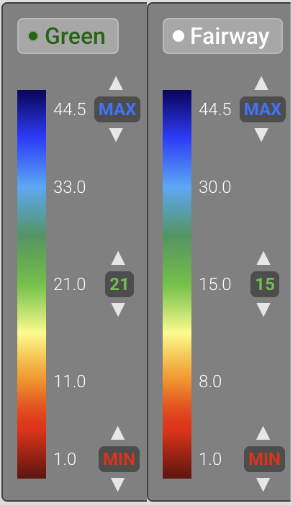
For example, your greens may have one Midpoint value, while your fairways may have another. The purpose of the Midpoint setting is to make the moisture map easier to interpret visually. It helps define what appears green (optimal), red (dry), or blue (wet) on the turfRad map for each area type.
We recommend setting Midpoint so that your overall preferred optimal conditions are shown in green. Find an area on your course that you feel is in optimal condition. Use whichever tool you are accustomed to, whether it’s bouncing a ball, putting a knee down, or using your TDR and a known reference value for the specific area type (fairway, green, etc.).
The turfRad Midpoint setting is therefore a display and interpretation setting. It helps you understand field conditions quickly, but it is not the per-sprinkler target used by Spatial Adjust.
For many courses, the Midpoint value in turfRad is a useful starting point when deciding what Target VWC values to enter in Spatial Adjust.
👉 Read: Customize Display Moisture Presets
The Spatial Adjust "Target VWC" Setting
In Spatial Adjust, each sprinkler can have its own Target VWC value.
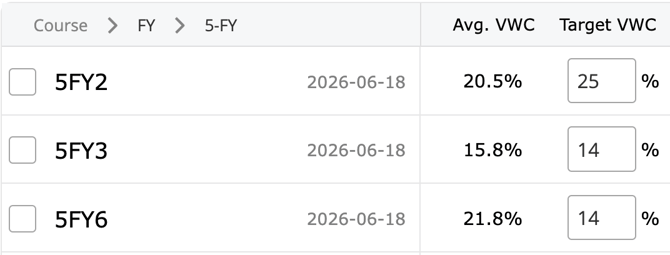
This is the moisture level that Spatial Adjust uses when calculating irrigation adjustments for that specific sprinkler. Spatial Adjust is designed to ensure that the sprinkler average moisture level converges to the Target VWC.
The logic of turfRad and Spatial Adjust is like the thermostat on your home’s heating system. You don’t just turn the heat on and off when you feel too hot or too cold, the system measures the temperature and provides just the right amount of added heat to maintain that set temperature.
The Target VWC is like this set temperature, and your turfRad data is the thermometer checking the current state. Spatial Adjust is the control system that determines exactly how much water is needed. The amount of water needed per sprinkler varies considerably due to changing environmental conditions; ET, irrigation, precipitation, drainage, lateral flow, compaction, inputs such as wetting agents. To be outright technical, the combination of turfRad and Spatial adjust is a feedback loop or a control system.
This is the key distinction between the Midpoint and Target VWC:
The turfRad Midpoint setting is configured by area type and controls how moisture is displayed (red/green/blue). The Spatial Adjust Target VWC is configured per sprinkler and controls how irrigation is adjusted.
Target VWC levels will be populated in Spatial Adjust according to the sprinkler moisture averages on the first turfRad data collection after Spatial Adjust is activated. You will then have the ability to adjust targets, bump down the Target on wet areas (shady spots, low valleys), bump up the Target on dry-tending areas (south facing slopes, quicker draining sections).
Using Shift Mode to Refine Target VWC Values
Finding the ideal moisture, or refining your Target VWC per sprinkler, is usually a gradual process. This is where Bulk Adjust Shift Mode becomes useful.
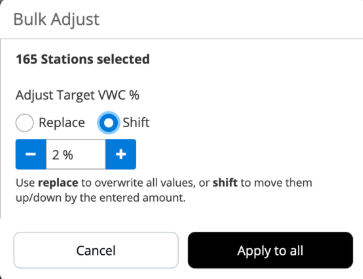
Shift Mode allows you to move multiple Spatial Adjust Target VWC values up or down systematically. For example, you may:
- Lower course-wide targets by 1%.
- Observe turf performance.
- Continue adjusting until you reach the desired balance of firmness, playability, and turf health.
You can also raise all Targets on a certain fairway that needs more water by 2%. If specific sprinkler areas begin showing stress, those sprinkler targets can then be adjusted up independently while maintaining the remaining levels.
This provides a systematic way to optimize moisture levels without making large changes all at once.
Key Takeaway
The value of Spatial Adjust is not automation alone. The real value is the combination of measurement and action, turfRad and Spatial Adjust working together to maintain consistency in an ever-changing environment.
The turfRad Midpoint setting helps you interpret moisture conditions and variability. The Spatial Adjust Target VWC setting tells Spatial Adjust what moisture level each sprinkler should work toward.
Together, turfRad and Spatial Adjust allow courses to move from spatially uniform estimated water replacement to sprinkler-level measured moisture management.