![turfrad_logo_outlines (1)-1.svg]](https://support.turfrad.com/hubfs/turfrad_logo_outlines%20(1)-1.svg)
turfRad Electrical Power requirements:
- switched 12V DC (on when ignition switch is on)
- power consumption max 0.5A @ 12V (6W)
- we recommend to put a 3A fuse inline (included in the Power Cable Kit v3)
Recommended Power Setup – turfRad Rev 1.5 (SN0700+)
⚠ Applies to turfRad Rev 1.5 (Serial Numbers SN0700 – SN1099)
-
Starting with Rev 1.5, turfRad uses a new Power Cable Kit v3 (dongle-style wiring system).
- Although the Power Cable Kit v3 still has the option for the cigarette lighter plug and the USB dongle we strongly recommend to use the direct wiring dongle!
-
While the mounting and positioning of the sensor remain unchanged, the wiring method is different and requires the Power Cable Kit v3
Find the PDF: Direct Wiring Instructions Rev 1.5 here
Video:
Recommended Power Setup – turfRad Rev 1.0 - 1.4 (SN0001+)
⚠ Best Option: Direct Wiring to key-switched 12V Power
This is the most reliable and maintenance-free setup, ideal for full-season use and long-term installations. It wires the turfRad sensor directly to the mower’s power system, which makes it water- and vibration-proof. This can solve the issue with loose connectors.
-
Connect the fused wiring kit behind the cigarette lighter jack or USB port insert (on newer machines), or to the wireless hour meter, or telematics port.
-
Additional power cables and Direct Wiring Kits are available if you regularly move sensors between vehicles.
Find the PDF: Direct Wiring Instructions Rev 1.0-1.4 here
USB Adapter
Our provided USB adapters can work well, but only if certain conditions are met.
-
Requires a 2A USB port, 1A ports may cause unstable behavior.
-
These ports are often unlabeled, making it hard to verify the power rating.
-
The spring-loaded power cable plug can loosen in the adapter’s cigarette lighter jack, and this connection is not water-tight; secure it with electrical tape or similar.
Cigarette Lighter 12V Jack
For vehicles without a locking 12V cigarette lighter jack, this option is prone to issues for long-term installation.
-
This connector can come loose or corrode over time, leading to power and data loss.
-
The standard power cable works well for locking 12V jacks, often labeled “Marine”, but we recommend contacting turfRad support to obtain a Direct Wiring Kit for long-term installations on non-locking jacks.
Charging turfRad from a Wall Socket
If the turfRad internal battery is discharged, you can charge the sensor from a standard wall socket.
- Connect the supplied USB-to-12V adapter to a suitable mains USB plug. The USB power source has to be at least 5V / 2A or more. Do not use a 5V / 1A charger.
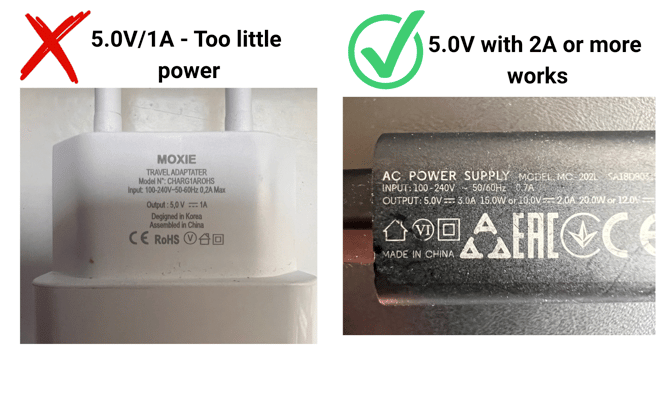
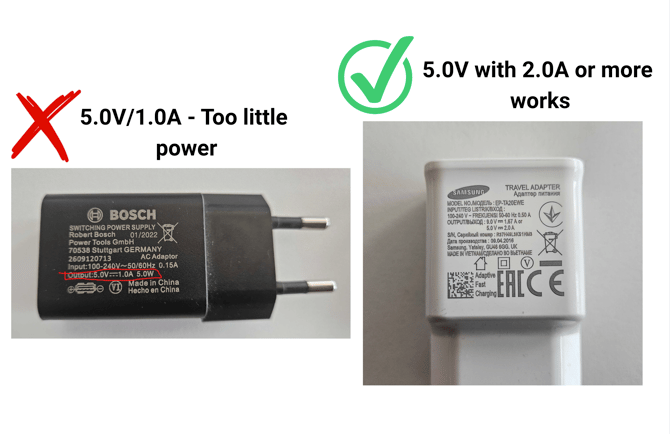
- Connect the adapter’s 12V output to the sensor’s 11–15V DC port. Push the connector fully into the sensor and screw it on tightly.
- If the battery is fully discharged, leave the sensor connected for approximately 4 hours before use.
If the sensor is beeping regularly and the blue FUNCTION light is not blinking, this can indicate that the internal battery needs charging. Keep the sensor connected to power before attempting to use it.
Important: Do not connect turfRad directly to any wall socket. Always use the appropriate USB-to-12V adapter with a 5V / 2A or more USB power source.
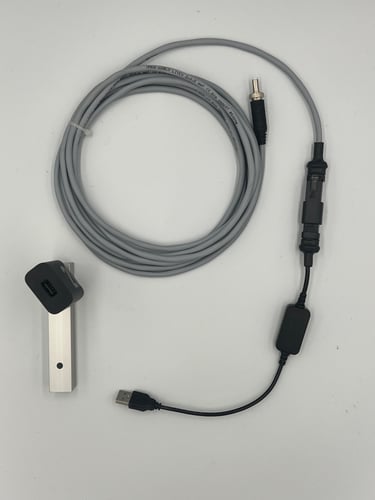
If your turfRad is not turning on this could be due to a blown fuse: go to Troubleshooting: TurfRad Not Powering On or Blowing Fuses