![turfrad_logo_outlines (1)-1.svg]](https://support.turfrad.com/hubfs/turfrad_logo_outlines%20(1)-1.svg)
It is possible to mount multiple turfRad sensors in an "array" style configuration on a cart to make covering large areas quicker, with larger space between passes, than with a single-sensor setup. We have gathered some insights from our experience and provide our recommendations here:
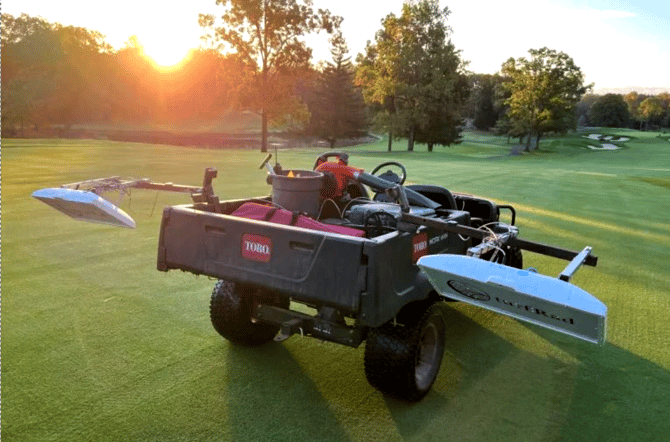
Recommendations:
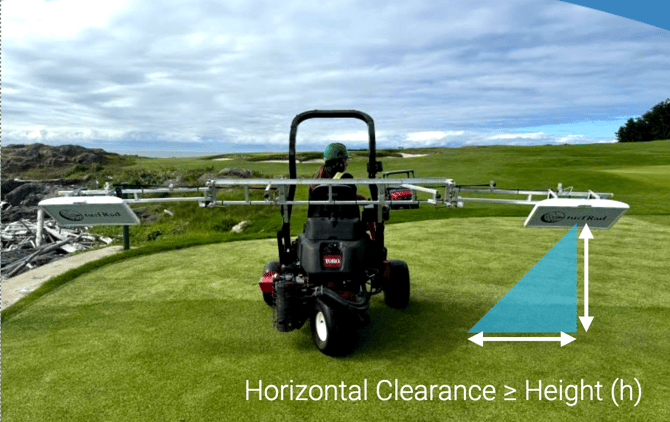
- We recommend maintaining 10 ft (3 m) between sensors in your array to avoid any “crossing” of tracks due to GPS error.
- Arrays with 2 sensors are sufficient, we do not support or recommend a 3 sensor array setup.
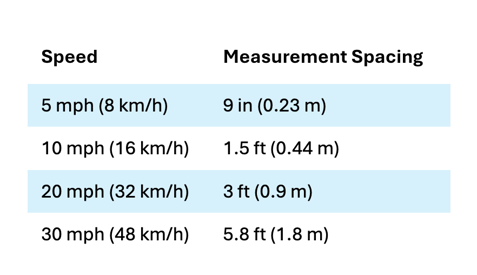
- The sensor takes 10 measurements per second. The table below shows the measurement spacing, in the driving direction, according to driving speed. See here for scanning tips: Best Practices for Consistent Sampling with turfrad
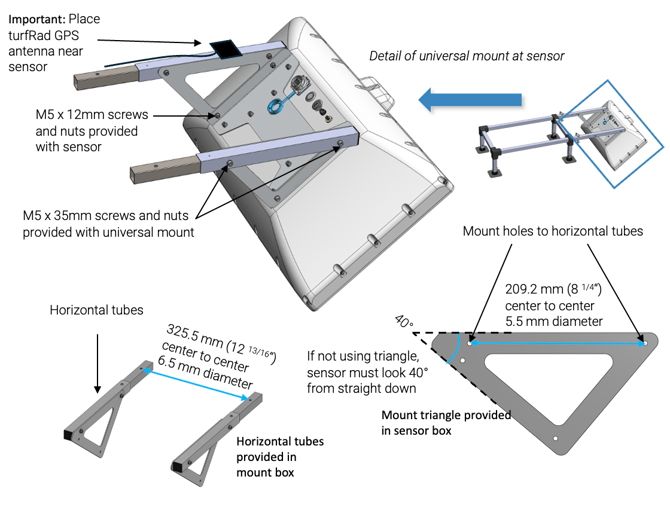
- If you are not using the provided triangles with your custom mount, ensure that you achieve and maintain a 40° angle of the turfRad antenna (measured relative to straight down)
- For reliable operation, array-mounted sensors should be powered using a stable, hardwired 12V supply. This ensures sufficient current for both operation and battery charging, especially in multi-sensor setups. USB adapters are not recommended, as they often cannot provide enough power for consistent performance.
-
Make sure your GPS antenna is placed as close to the sensor as possible, . i.e. not on the roof of your cart.
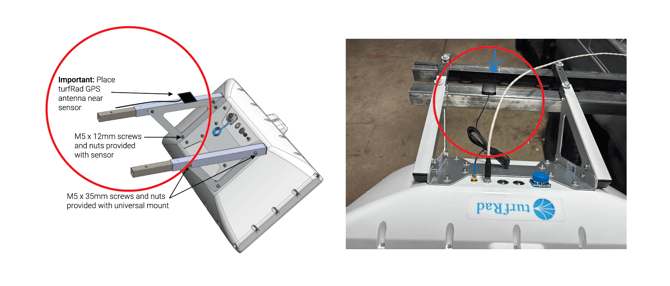
You can use the universal turfRad mount hardware as a component of your "array" or you can go fully custom. Because the sensors are designed and manufactured in Europe (Switzerland), the units for dimensions and hardware are metric. We provide the conversion to inches in parentheses below:
What Happens If There Are Gaps in Coverage?
If you miss a small area while scanning, turfRad will typically fill in minor gaps automatically using surrounding measurements. This process is called interpolation, and it helps create a continuous moisture map even if coverage is not perfectly uniform. However, if the missed area is too large — if the distance between passes exceeds ~5 meters (16.5 ft) — turfRad will show a visible data gap on the map.
For a further explanation, see: What Happens If I Miss a Spot While Scanning With the Array Mount?