![turfrad_logo_outlines (1)-1.svg]](https://support.turfrad.com/hubfs/turfrad_logo_outlines%20(1)-1.svg)
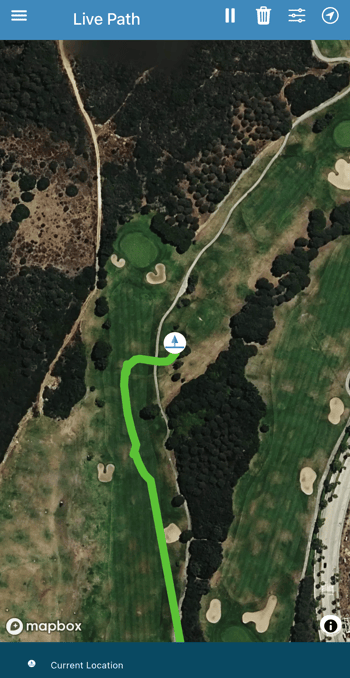
The Live Path feature in the turfRad mobile app shows your scan coverage in real time as you drive. It helps you maintain consistent spacing, avoid gaps, and improve overall data quality.
What It Does
As you move, the app displays your position and shades the area you’ve covered on the map. This gives you a clear visual reference of where you’ve already scanned.
Key Notes
- Uses your phone’s GPS (not sensor data)
- Only active while the Live Path screen is open
- Not saved or available for later review
- Currently in BETA
How to Use It
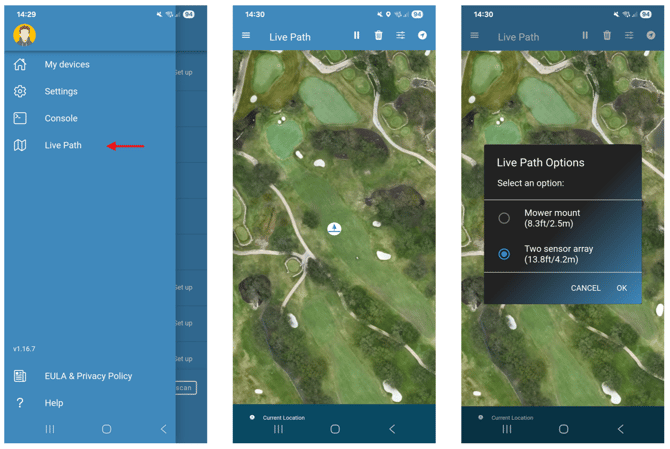
- Open the turfRad app
- Tap the menu (☰)
- Select Live Path
As you drive, the app will automatically display your coverage.
Adjust Scan Width
To match your setup:
- Tap the options icon (top right)
- Select your configuration (e.g. Two sensor array – 13.8 ft / 4.2 m)
This ensures the shaded area reflects your actual coverage.
Controls
Use the top bar to:
- Pause tracking
- Clear the path
- Switch to heading-up view
Requirements + Tips
- Enable GPS and Precise Location permissions
- Use a phone holder for visibility while driving
- Keep the screen open during the scan
- Adjust width to match your setup for best results
Battery Note
Live Path uses continuous GPS and can drain battery - consider charging during use.