![turfrad_logo_outlines (1)-1.svg]](https://support.turfrad.com/hubfs/turfrad_logo_outlines%20(1)-1.svg)
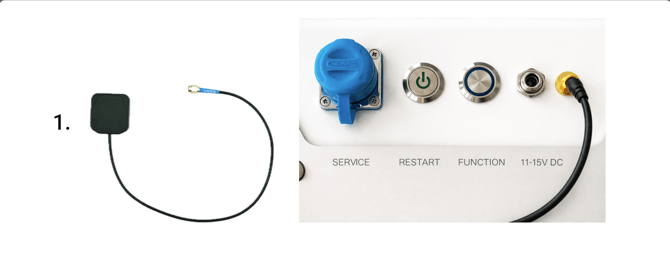
1. Place the GPS antenna close to the sensor. Then connect the black wire to the gold GPS connector.
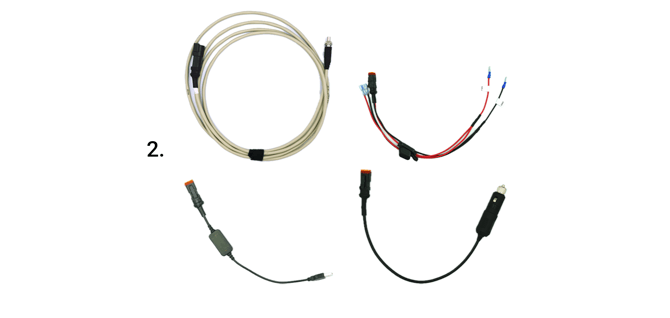
2. Choose the desired power cable for your setup. We recommend using the direct wiring dongle for maximum reliability of your setup. Alternatively, you can use the cigarette lighter plug or the USB dongle. Be aware that when using the USB dongle, the USB port must be rated for 5V 2A and not 5V 1A. If using the cigarette lighter plug, ensure it works reliably and doesn’t easily lose power from vibrations (check green LED on the plug).
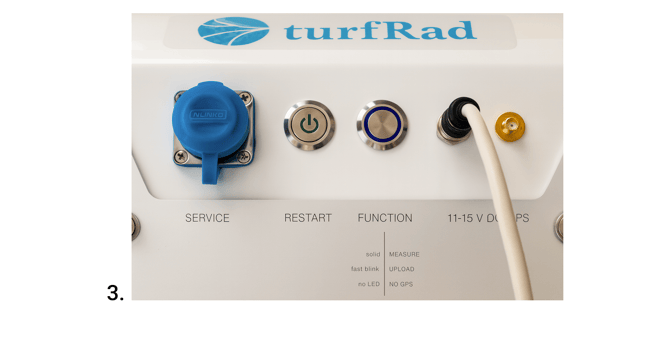
3. Next, connect the power cable to your vehicle. You can use either the direct wiring dongle, the USB dongle, or the cigarette lighter plug. We do not recommend using the cigarette lighter plug in non-locking receptacles. Now connect the other end to the11-15V DC port of the turfRad sensor. Make sure the plug is fully inserted and screwed on tightly.
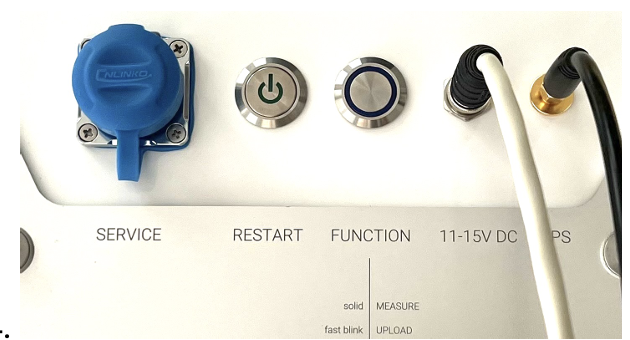
4. The picture above shows the connected power cable and GPS antenna. When you power on your vehicle, the LED on the RESTART button should turn on. As soon as the GPS signal is found, the blue LED on the FUNCTION button will start to blink slowly (once per second). Note that this can take up to 20 minutes and requires a clear view of the sky.